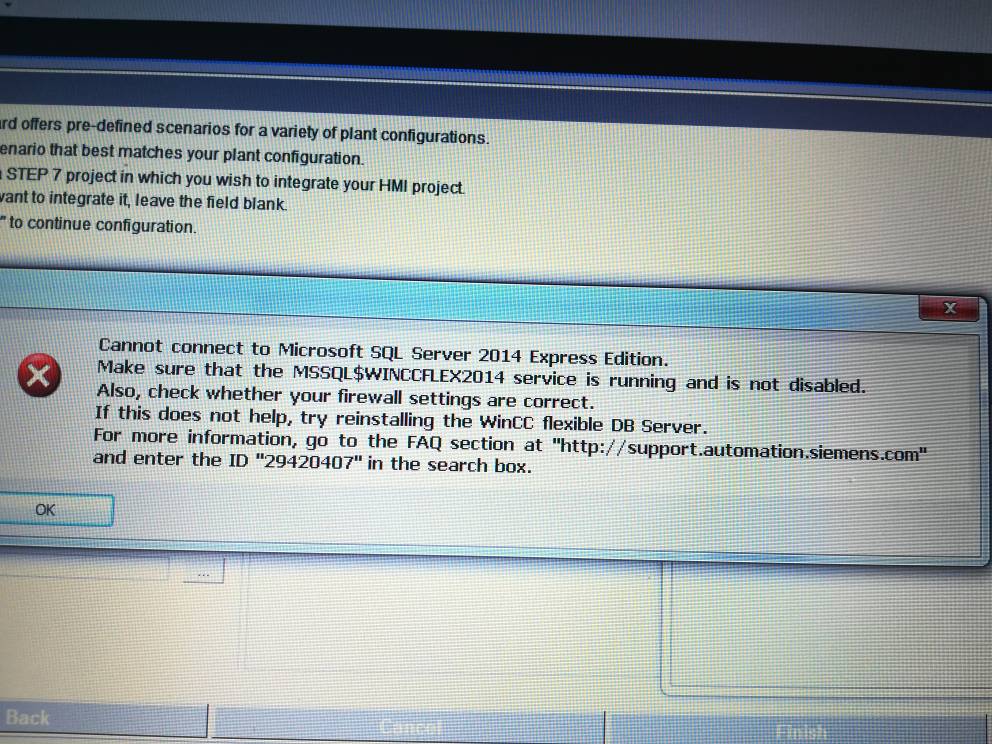
Bu bölümü tekrar tekrar yaptım, tia portal v14 de vardı onunla alakalıdır diye onuda sildim sonuç aynı oluyor.
1.6 Problems installing Microsoft SQL Server 2014 Express with WinCC flexible SP1 or WinCC flexible 2008 SP5
Description
Uninstallation of the SQL Server and re-installation of the SQL Server via the WinCC flexible Setup.
Possible cause
The user data of Microsoft SQL Server 2014 Express might be damaged.
Remedy
Uninstallation of the SQL Server and re-installation of the SQL Server.
Procedure
Uninstall the entries below via "Control Panel" > "Software"
"Microsoft SQL Server 2014 Express Edition (WINCCFLEX2014)"
"Microsoft SQL Server Native Client"
"Microsoft SQL VSS Writer"
"Microsoft SQL Server Setup Support Files (English)".
Start the repair installation of WinCC flexible via "Control Panel" > "Software" >"WinCC flexible SP1" "Change" >"Repair program".
The Setup recognizes that the SQL Server is missing and re-installs the SQL Server.
Now restart your operating system.
Start WinCC flexible and create a new project.
Note
If WinCC V14 (TIA Portal) is installed, you must do a repair installation here as well, because the uninstallation described above also removes the instance of the SQL Server from WinCC V14.
Bunun dışında yapmam gereken birşeyler varmı?